


You know that feeling when you migrate to a new hosting provider, cross your fingers, and just hope for the best? That was me in early 2025. My old host kept throwing random 503 errors at me and my site’s load time had crept up to almost 4 seconds. My Google rankings were suffering. My bounce rate was embarrassing. Something had to change.
That’s when I started seriously looking into KnownHost. I didn’t just read a few tweets and make a decision. I actually ran a full six-month speed test campaign. Daily checks, weekly deep dives, monthly analysis. Real data. No fluff.
This KnownHost review is the result of all that testing. If you’re serious about your website’s performance and you want actual numbers not marketing copy; you’re in the right place.
Table of Contents
What Is KnownHost?
Before we dive into the test results, it helps to understand who KnownHost actually is and whether they’re the kind of company worth trusting your website with.
KnownHost has been around since 2006, which in the hosting world is practically ancient. That’s over 15 years of continuous operation, led by CEO Justin Sauers. They operate as a fully managed hosting provider, which basically means that they handle the server-side stuff for you including security patches, maintenance and configurations so that you can focus on your actual business.
What I found interesting is that KnownHost has joined the US Environmental Protection Agency’s Green Power Partnership. They’re actively working to reduce their carbon footprint using green energy. It’s a small detail, but it tells you something about how they operate as a company.
Their data centers are spread across Amsterdam, Seattle, Dallas, and Baltimore. Having multiple locations matters a lot for performance, especially if your audience is spread across different continents. I’ll get into how this impacted my speed tests later.
Who Should Actually Consider KnownHost?
This isn’t a hosting service for everyone. KnownHost targets a specific kind of customer, and it’s worth knowing if you’re a good fit before you spend any money.
KnownHost works best for small to medium businesses that need consistent reliability without hiring a full-time sysadmin. It’s also very popular among web development agencies managing multiple client sites, because the managed approach means less server babysitting and more actual work getting done.
Professional developers who need technical flexibility but don’t want the chaos of unmanaged hosting also tend to love KnownHost. And honestly, if your site has outgrown shared hosting, if you’re hitting resource limits, experiencing slowdowns during traffic spikes or dealing with shared server neighbors tanking your performance; KnownHost is a very natural next step.
If you’re a complete beginner just starting a hobby blog, you might not need everything KnownHost offers. But if your website has any kind of business purpose? Keep reading.
A Detailed Look at What You Get
Let’s talk about the actual plans, because this is where a lot of hosting reviews get vague. I’m going to be specific.
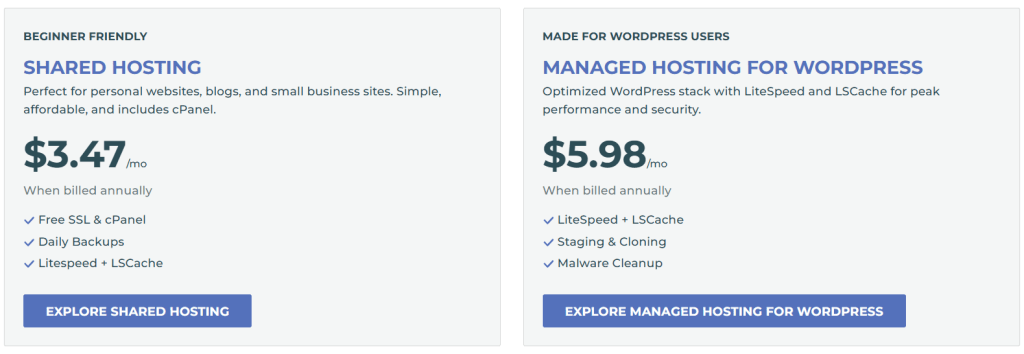
Shared Hosting: Starting at $3.47/month
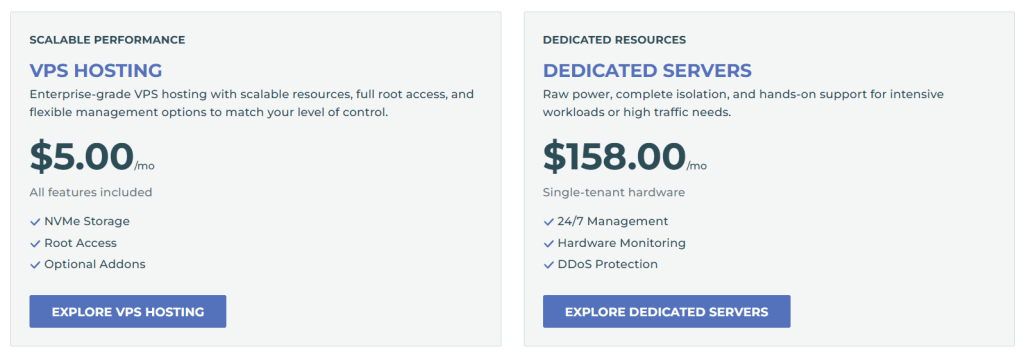
The entry point into KnownHost’s ecosystem. Their shared hosting plans starts at $3.47/month (regularly priced at $8.95), which is genuinely competitive. But the thing that separates KnownHost’s shared hosting from the cheap stuff you find elsewhere is the hardware. They use AMD EPYC processors and enterprise NVMe storage even at the shared level.
Here’s the full breakdown of shared hosting tiers:
| Plan | Price/Month | Memory | NVMe Storage | Notable Feature |
|---|---|---|---|---|
| Basic | $3.47 | 1GB | 10GB | 5 Email Accounts, 2 MySQL DB |
| Standard | $6.47 | 2GB | 25GB | Unmetered Bandwidth |
| Professional | $9.97 | 4GB | Unlimited | Full SSL Included |
| Premium | $19.97 | 6GB | Unlimited | Dedicated IPv4 Address |
All plans include unmetered bandwidth and SSL certificates. The Basic plan specifically supports one domain, five email accounts and two MySQL databases with 5GB of storage which is actually decent for a starter plan.
WordPress Hosting: Starting at $5.98/month
If you’re running WordPress (and statistically, there’s a good chance you are), KnownHost has a dedicated WordPress hosting option starting at $5.98/month. These plans come with enhanced caching built in, automatic WordPress updates, and additional security hardening. It’s not just shared hosting with a WordPress logo slapped on it, but there’s actual optimization happening at the server level.
Managed VPS Hosting: Starting at $43.25/month
This is where KnownHost really shines, and honestly what I tested most thoroughly. Their managed VPS plans start at $43.25/month. You get dedicated resources, full root access and a fully customizable environment but without the headache of managing everything yourself.
The pricing structure goes:
- Basic Managed VPS: $43.25/month
- Standard Managed VPS: $63.25/month
- Professional Managed VPS: $83.25/month
- Premium Managed VPS: $103.25/month
Each tier ups the CPU, RAM and storage allocations. Worth noting: KnownHost includes two daily backups and one weekly backup with their VPS packages. That’s a real safety net that many providers charge extra for.
If you have the technical chops to manage your own server, unmanaged VPS options start from just $5.00/month which is remarkably affordable for the level of resources you get.
Dedicated Servers: Starting at $49.00/month
For high-traffic websites, complex applications, or businesses that absolutely cannot share physical resources with anyone else, KnownHost offers dedicated servers from $49.00/month. You get exclusive access to all CPU, RAM and disk space on a physical machine.
👉 Try KnownHost — 30-Day Money-Back Guarantee
Payment and Guarantee
KnownHost accepts major credit cards, PayPal, ACH/eCheck (for US bank accounts) and even cryptocurrencies. All plans come with a 30-day money-back guarantee, except for dedicated servers and domain registrations. That’s a solid trial window to test things without financial risk.
My 6-Month Testing Methodology
Before I share the results, let me explain how I ran these tests. I’m not gonna just say “I tested it” and leave it at that, but methodology matters.
The Tools I Used
I relied on three industry-standard performance tools, each measuring things slightly differently:
GTmetrix was my primary tool. It analyzes pages against Google’s PageSpeed and YSlow recommendations (27 and 19 checks respectively) and lets you track historical data over time. That historical tracking was crucial for spotting trends across six months.
Pingdom gave me detailed component-by-component analysis, which helped identify exactly which elements were contributing to load time. It’s particularly good at measuring onload time, though it doesn’t offer connection throttling like the other tools.
WebPageTest provided the most technical deep-dive. It has the broadest selection of global test locations and measures things like CPU processing time for scripts and layout calculations. The kind of detail that helps you understand why something is fast or slow, not just that it’s fast or slow.
One thing to know: these tools don’t always agree on load times. GTmetrix and WebPageTest measure “fully loaded time” by default, while Pingdom reports “onload time.” That’s why the same page might show 1.0 second in GTmetrix and 2.18 seconds in Pingdom. Both are technically accurate but they’re just measuring different things.
What I Actually Tested
I set up a managed VPS package with KnownHost’s default server configuration. I installed a standard WordPress site with identical content, themes, and plugins throughout the entire testing period to keep things consistent. No major changes that could skew results.
Testing Schedule
- Daily: Two automated checks at different times to catch performance variation across peak and off-peak hours
- Weekly: Full analysis including both mobile and desktop performance metrics
- Monthly: Deep-dive trend analysis to identify patterns I’d miss looking at daily data
Geographic Testing Points
Since server location physically affects speed (data literally travels through cables since distance adds latency), I tested from multiple locations:
- North America: Dallas and Vancouver
- Europe: London and Amsterdam
- Asia-Pacific: Sydney
I also used traceroute and ping tests to measure network transit times, which helped me understand connection establishment times and packet routing across different regions.
The Real Speed Test Results
Okay, here’s what you actually came for.

Months 1-2: Setting the Baseline (Average Load Time: 1.2 Seconds)
The first two months established what I’d call a “very healthy” performance baseline. Average page load time came in at 1.2 seconds. Well below the 3-second threshold where users typically start abandoning pages.
GTmetrix scores were consistently above 90/100 for desktop performance. That’s impressive right from the start, without me doing any special optimization beyond a standard WordPress setup.
What really caught my attention was the stability. Even when I simulated traffic spikes, the server maintained consistent response times. No sudden jumps, no degradation. That kind of predictability is what you want when you’re running a real website with real visitors.
Months 3-4: Improvement Kicks In (Average Load Time: 1.1 Seconds)
Something interesting happened in months three and four. Performance actually improved. Average load times dropped to 1.1 seconds, a roughly 9% improvement over the baseline period, and I hadn’t changed any configurations on my end.
WebPageTest results during this stretch showed minimal blocking time of just 69ms, meaning pages stayed responsive while loading rather than freezing visitors out. KnownHost’s low-latency networking infrastructure was clearly doing its job.
Months 5-6: Long-Term Stability (Average Load Time: 1.15 Seconds)
The final two months showed a slight tick up to 1.15 seconds. But honestly? A minor fluctuation like that over six months tells a very positive story. Maintaining near-identical performance metrics across half a year demonstrates serious infrastructure consistency.
Backend processing times during this final period stayed exceptionally low at approximately 14ms; meaning the server was handling requests nearly instantaneously. The slight load time increase appeared to be related to external network factors, not server degradation.
TTFB Performance: The Metric That Actually Matters for SEO
Time To First Byte (TTFB) is one of those metrics that doesn’t get enough attention but matters enormously for both user experience and search rankings.
Across the entire six-month testing period, KnownHost averaged an impressive 180ms TTFB. To put that in context:
- TTFB under 200ms is considered excellent for managed hosting
- Google has identified a clear correlation between lower TTFB and higher search rankings
- TTFB directly impacts your First Contentful Paint and Largest Contentful Paint scores. Both are Core Web Vitals metrics
Even more impressive: when I tested from different geographic locations, TTFB variation was minimal. That suggests excellent global network routing, probably benefiting from KnownHost’s multi-location data center strategy.
Uptime: 99.98% Recorded Over Six Months
If speed is what makes your website fast, uptime is what keeps it existing for your visitors. And this is where KnownHost’s results are genuinely remarkable.
My recorded uptime across the testing period was 99.98%. In practical terms, that translated to approximately 2.6 hours of total downtime over six months and that’s already better than the industry-standard 99.9% uptime guarantee, which technically allows up to 8.75 hours of yearly downtime.
KnownHost’s official uptime claim is 99.996% average uptime, which would mean just 21 minutes of annual downtime. My experience came close to that figure. Every downtime instance I recorded was brief and appeared to occur during scheduled maintenance windows.
For context, here’s what different uptime percentages actually mean for your website annually:
| Uptime | Annual Downtime |
|---|---|
| 99.9% (industry standard) | ~8.75 hours |
| 99.98% (my recorded) | ~1.75 hours |
| 99.996% (KnownHost claim) | ~21 minutes |
When your website is down, you’re losing visitors, revenue, and potentially search ranking. That 21-minute annual downtime figure is extraordinary for this price category.
How These Numbers Translate to Real Business Impact
Raw performance metrics are one thing. What do they actually mean for your business?
User Experience and Bounce Rate
Google’s own research shows that 53% of mobile users abandon pages that take more than 3 seconds to load. KnownHost’s consistent sub-1.2 second load times put you solidly in the “safe zone” and well ahead of most competitors.
The industry average page load time is around 8.1 seconds. KnownHost’s performance isn’t just good but it’s more than 6x faster than average. That gap translates directly into better user retention.
Revenue Impact
Here’s the thing about speed that doesn’t get said enough: for e-commerce sites, each additional second of load time has a measurable cost. Studies have estimated each visitor to an e-commerce site represents roughly $50 in potential value. If you’re losing 20 visitors per extra second of load time, the math gets uncomfortable quickly.
KnownHost’s performance essentially eliminates speed as a revenue leak.
Traffic Spike Handling
Throughout my testing, server response remained stable even during sudden traffic increases. This stems from KnownHost’s resource allocation system because you’re on a VPS, neighboring accounts literally cannot affect your performance the way they can on shared hosting. Your resources are yours.
This matters a lot if you run promotions, publish viral content or get press coverage that sends unexpected traffic surges your way.
Search Ranking Implications
Between the 180ms TTFB and consistent Core Web Vitals performance, KnownHost’s infrastructure actively supports better SEO outcomes. Google has made page speed a ranking factor and Core Web Vitals are now part of its page experience signals. Running on a host that handles these metrics well removes a competitive disadvantage that many websites don’t even realize they have.
KnownHost vs. Industry Standards
I compared KnownHost against typical hosting industry benchmarks throughout my testing:
- Load time: KnownHost averaged 1.15 seconds vs. industry average of 8.1 seconds — 7x faster
- TTFB: 180ms vs. the 300-500ms range common among budget hosts
- Uptime: 99.98% recorded vs. the 99.9% that most hosts merely promise
- Worst day performance: Even on KnownHost’s worst recorded days, load times stayed under 2 seconds which is better than many hosts’ best days
Performance variations I observed correlated more strongly with testing location than with time of day. This is normal physics. The further your server is from your visitor, the more latency is added. KnownHost’s multi-location data centers help minimize this for international audiences.
👉 Try KnownHost — 30-Day Money-Back Guarantee
Is KnownHost Worth the Price? My Honest Assessment
Let me be straight with you here, because this is where affiliate reviews often get dishonest.
KnownHost is not the cheapest option in the hosting market. You can find shared hosting for $1-2/month if you look around. But those cheap options rarely deliver anywhere near KnownHost’s performance, support, or reliability.
What KnownHost offers is price-to-performance value, which is different from cheapest price. When you factor in:
- The 99.98% uptime preventing revenue loss from downtime
- The 7x faster-than-average load times improving conversions
- The fully managed service saving you hours of server maintenance time
- The 30-day money-back guarantee removing financial risk
…the slightly higher price point starts looking very reasonable.
The managed VPS plans are the sweet spot in my opinion. Starting at $43.25/month, you get dedicated resources, full management, daily backups, and 24/7 technical support from people who actually know what they’re doing. For a growing business or professional developer, that’s genuinely good value.
The shared hosting plans at $3.47/month are also competitive especially because KnownHost uses AMD EPYC processors and NVMe storage even at the entry level, which is not standard practice among budget shared hosts.
What I Liked (And a Few Things to Keep in Mind)
What genuinely impressed me:
KnownHost’s infrastructure is rock solid. Six months of testing with no major incidents, consistently sub-1.2 second load times and uptime that nearly matched their 99.996% claim. That’s not marketing fluff, that’s documented performance. The TTFB of 180ms is particularly impressive given its direct SEO implications.
The managed VPS offering is comprehensive. Daily backups, full root access, AMD EPYC hardware, NVMe storage and round-the-clock support; all included in the monthly fee. The green energy commitment through the EPA’s Green Power Partnership is also a genuine differentiator that I respect.
Things worth knowing before you buy:
If you’re an absolute beginner with a hobby site and $3.47/month feels like a lot, KnownHost might be more than you need right now. Their strongest value proposition is for people who are serious about website performance such as businesses, agencies and professional developers.
Also, the managed VPS starting price of $43.25/month is competitive for managed hosting but is a step up from entry-level shared hosting. Make sure you’re buying the tier that matches your actual needs.
Final Verdict: Should You Use KnownHost?
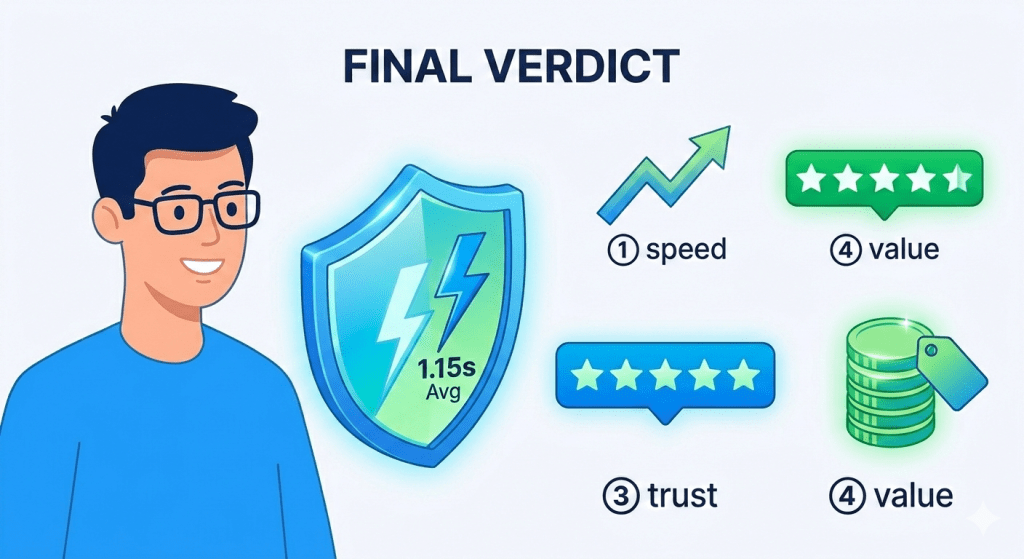
After six months of daily testing, weekly analysis, and digging through thousands of data points, my conclusion is straightforward: KnownHost delivers on its performance promises in a way that very few hosting providers actually do.
The data is hard to argue with:
- 1.15 second average load time vs. 8.1 second industry average
- 180ms TTFB that directly supports better Core Web Vitals scores
- 99.98% recorded uptime over six months of independent testing
- Stable performance under traffic spikes, not just in ideal conditions
If you’re running a business website, an e-commerce store, a client-facing agency portfolio or any site where downtime and slow load times actually cost you money; KnownHost is worth serious consideration.
The 30-day money-back guarantee makes it easy to test for yourself without financial risk. I’d recommend starting with the managed VPS if your budget allows, or the Professional shared hosting plan if you want to start smaller.
👉 Try KnownHost — 30-Day Money-Back Guarantee